Vacation Rentals
airbnb digital guidebook
airbnb digital guidebook
A digital guidebook is a simple, shareable resource that helps Airbnb hosts provide essential property information to guests. It includes details like check-in instructions, Wi-Fi passwords, house rules, appliance usage, and local recommendations - all accessible online without downloads. By addressing common guest questions upfront, hosts save time and improve the guest experience.
Key Benefits:
- 42% fewer guest messages during stays.
- 0.3-star increase in average review scores.
- Saves up to 10 hours weekly answering repetitive questions.
Essential Sections:
- Arrival Info: Check-in/out times, directions, parking, and lockbox codes.
- Wi-Fi & Amenities: Network details, appliance instructions, and safety tips.
- House Rules: Clear policies on noise, pets, and extra fees.
- Local Tips: Nearby restaurants, shops, and attractions.
- Emergency Contacts: Host number, 911, and nearest hospital.
Using tools like Howard, hosts can create and share guidebooks effortlessly, update them instantly, and even automate FAQs. This not only reduces guest inquiries but also boosts ratings and enhances overall efficiency.
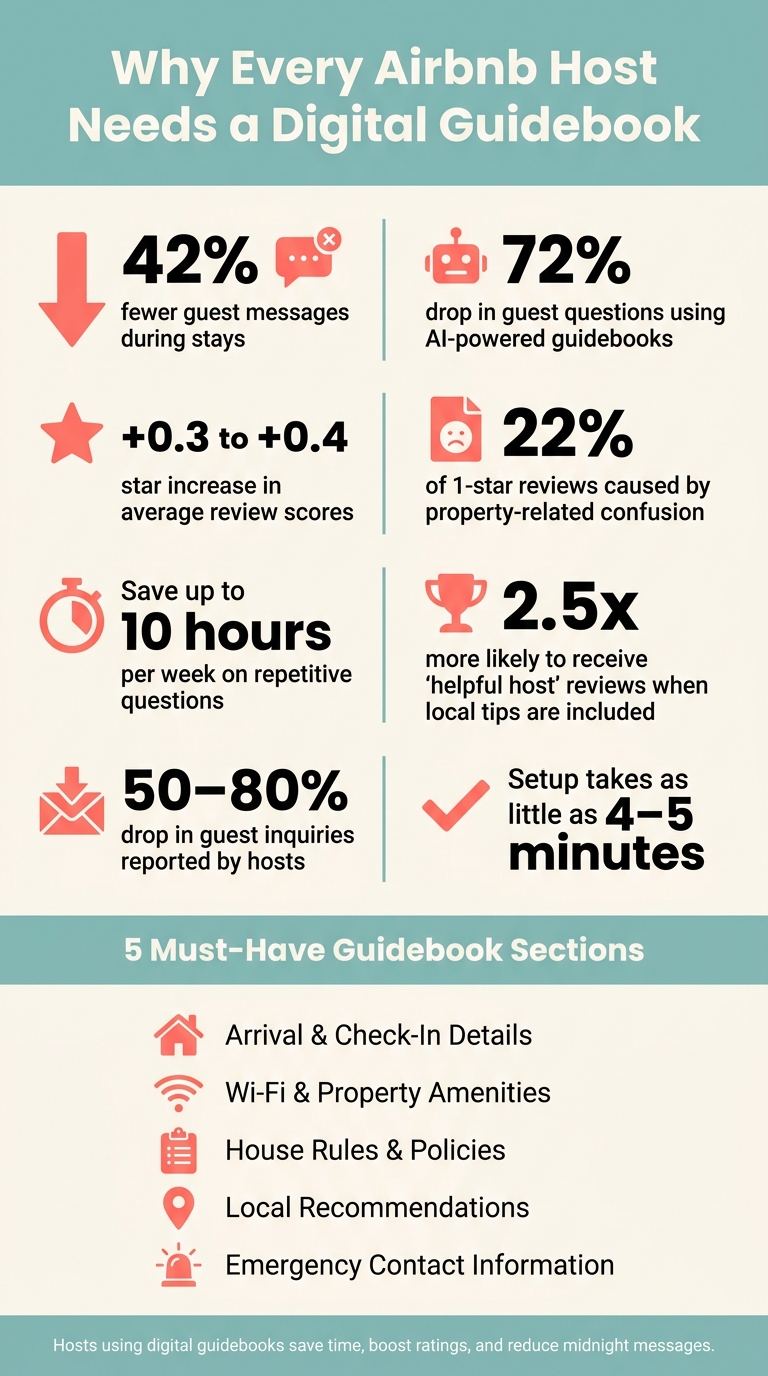
Airbnb Digital Guidebook: Key Stats & Benefits at a Glance
Turn Your Airbnb Listing into a 5-Star Digital Guidebook - Instantly
sbb-itb-ec91689
Key Components of a Good Guidebook
Creating a guidebook that ensures a smooth guest experience requires more than just compiling information. A great digital guidebook is a thoughtfully structured resource that answers essential questions exactly when guests need them. By anticipating guest needs, you can make their stay seamless and enjoyable. Here are five must-have sections for any guidebook.
Arrival and Check-In Details
This section is the cornerstone of any guidebook. Guests need clear, straightforward instructions to start their stay on the right foot. Include the full property address, detailed directions from major landmarks, and precise parking information - such as designated spots, permits, or areas that might not be immediately obvious.
Spell out the check-in and check-out times (e.g., Check-in: 3:00 PM, Check-out: 11:00 AM) and clarify your late check-out policy upfront. For properties using lockboxes or smart locks, provide the lockbox code, its exact location, and a photo for clarity.
Bert Perez, owner of KeysCations, shared how standardizing these details in digital guidebooks helped his team save 10 hours weekly on repetitive guest questions. His approach even boosted direct bookings by 15%:
"With 247 guests a month across 29 waterfront rentals, we've saved up to 10 hours a week on repetitive inquiries and grown direct bookings by 15%." - Bert Perez, Owner, KeysCations
Once guests are settled, the next step is ensuring they can make full use of the property’s features.
Property Amenities and How to Use Them
Start this section with what guests will search for immediately: the Wi-Fi network name and password. Place it prominently at the top. Follow this with instructions for less intuitive features like HVAC systems ("Set the thermostat to 72°F for optimal comfort"), stovetops, and the location of extra essentials like towels or a first aid kit.
For outdoor amenities like pools, hot tubs, or grills, include safety reminders alongside usage instructions. For example, note where the propane tank is stored and how to handle pool covers. Visual aids, like a photo of the thermostat with arrows pointing to key controls, are far more effective than lengthy text. Properties that provide detailed guidebooks often receive 23% fewer guest inquiries during stays and score higher in communication-related reviews.
House Rules and Policies
Guests are more likely to respect house rules when you explain the reasoning behind them. For instance, "Quiet hours are 10:00 PM–8:00 AM to respect our neighbors" feels more relatable than a simple "No noise after 10 PM."
Include all essential policies, such as smoking rules, pet allowances, maximum occupancy, and any associated fees. For example, "A $150 pet fee applies per stay." If there are charges for late check-outs or extra guests, list them clearly to avoid misunderstandings.
Beyond policies, a personal touch can enhance their stay.
Local Recommendations
This section is where your guidebook goes from purely functional to genuinely engaging. Provide a curated list of your favorite local spots. Highlight nearby restaurants with a brief description, the closest grocery store (mention the distance in miles), and attractions worth visiting. Include practical details like operating hours in AM/PM format ("Open Mon–Fri, 9:00 AM–6:00 PM") to save guests the hassle of figuring out time conversions.
Emergency Contact Information
Every guidebook needs a dedicated emergency section that’s easy to locate. Include essential numbers like 911, the nearest hospital’s address and phone number, the local non-emergency police line, and the Poison Control hotline (1-800-222-1222). Don’t forget to include your own contact number so guests know exactly who to reach out to if issues arise at the property.
Choosing and Setting Up Your Guidebook Tool
Once you've outlined your guidebook content, the next step is selecting a tool that simplifies delivery and keeps guest communication smooth.
Why Howard Works for Airbnb Hosts
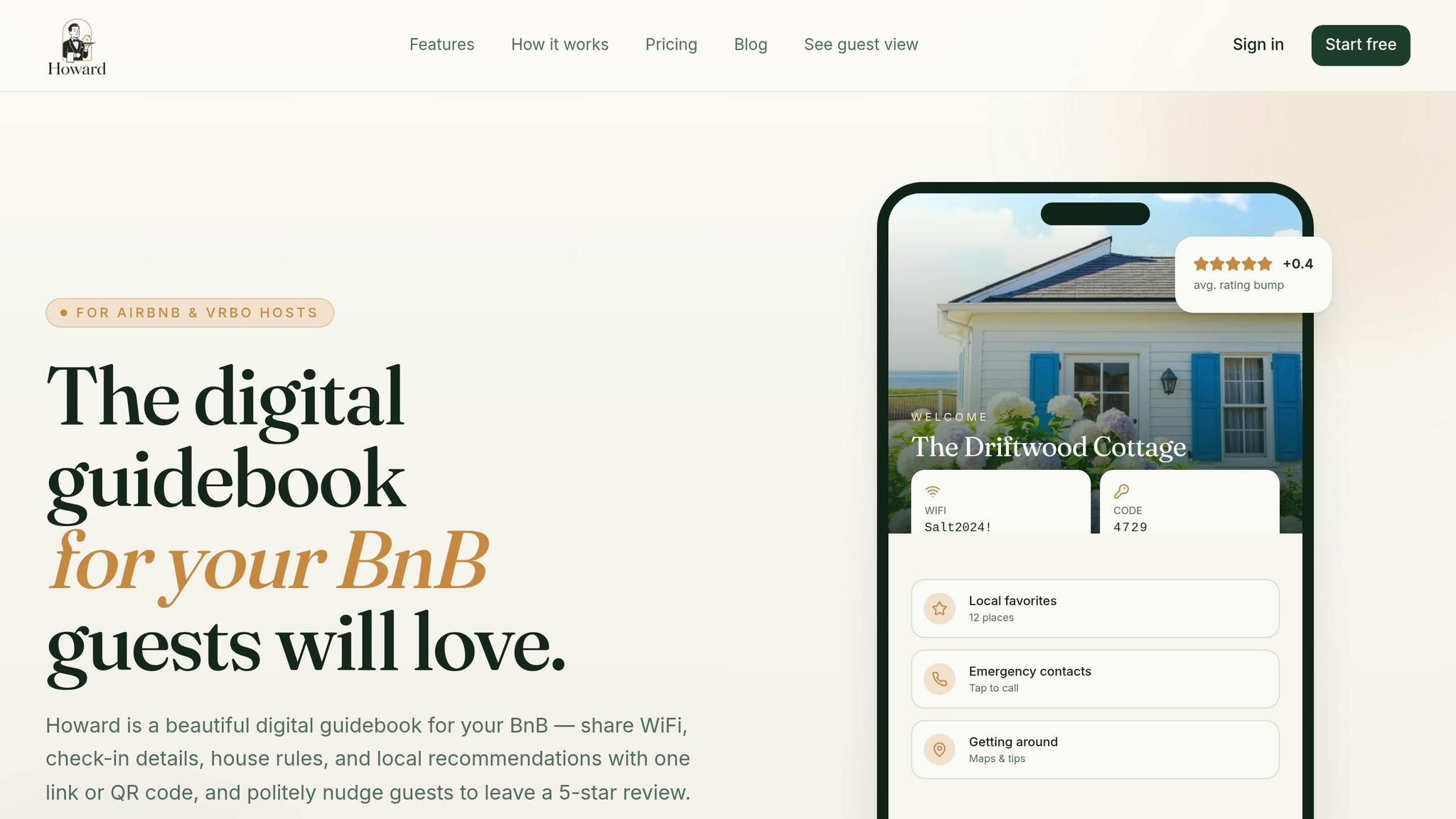
Howard was designed specifically with Airbnb and Vrbo hosts in mind. It handles the essentials of short-term rental management, including lockbox codes, check-in times, house rules, local tips, and emergency contacts. Everything is packaged into a single, shareable link or a printable QR code, so guests don't need to download an app - removing a common hassle.
One standout feature is Howard's AI-powered FAQ, which automatically answers repetitive questions like Wi-Fi passwords, parking details, or thermostat instructions. Even if a guest asks something at 2 a.m., the AI has you covered. For anything it can’t handle, the inquiry is forwarded directly to you via Slack or email. Hosts using Howard have seen a 72% drop in guest questions and an average rating boost of +0.4 stars.
"My superhost rating finally stopped slipping. Guests stop messaging me at midnight asking about the WiFi." - Margaret L., Host of 3 properties
Howard offers a free plan for one property - no credit card required - making it an easy, risk-free option for new hosts. Once you’re ready, you can start organizing your guidebook content within the platform.
Setting Up Your Guidebook Structure in Howard
Getting started with Howard is quick and straightforward. The platform organizes your guidebook into four main sections: Property Essentials (like Wi-Fi and lockbox codes), Local Recommendations, Emergency & Instructions, and Review Nudges. This structure ensures guests have a smooth experience from check-in to check-out, and setup takes just about 4 minutes.
After entering your property details, Howard generates a QR code that you can print and display at entry points, giving guests instant access.
"Setup took 5 minutes. The review nudge alone has paid for Howard ten times over in the first month." - Daniel K., Superhost
For hosts managing multiple properties, Howard’s centralized dashboard makes life easier. You can create a master guidebook and customize it for each listing, saving time by avoiding repetitive setup tasks.
Writing and Organizing Your Guidebook Content
Writing Clear Property Instructions
When creating your guidebook, aim to write instructions that leave no room for confusion. This approach ensures you address every potential question before it arises. As Touch Stay explains:
"If you assume the guest will never message you, you end up writing clearer instructions - and they end up messaging you less."
Keep your language simple and direct, avoiding unnecessary details. For tasks that require hands-on guidance - like using a combo washer-dryer, locating a hidden lockbox, or adjusting a Nest thermostat - include a short photo or video. Visuals are often more effective than words at clarifying steps. For multi-step processes (like entry codes, oven settings, or trash schedules), break them into numbered steps to make them easy to follow and reduce the need for repeated explanations.
Put essential arrival details - such as the Wi-Fi password, HVAC controls, and entry instructions - in a "First 5 Minutes" section right at the top. Guests who receive this information upfront are far less likely to send late-night messages asking about basic details.
Once you've covered the essentials, consider adding local recommendations and emergency information to make your guidebook even more helpful.
Adding Local Tips and Emergency Info
Include 3–5 carefully chosen local recommendations, categorized by purpose: the best breakfast spot, the nearest grocery store, or the most reliable delivery option. This kind of tailored advice helps guests avoid decision fatigue and feels more personal than a generic list pulled from a search engine.
For emergency information, placement is just as important as the details themselves. Provide your direct contact information, the nearest hospital or 24-hour urgent care, and the locations of on-property safety items like fire extinguishers and first aid kits. Mary Kay Lee of Villa Destino Vieques in Puerto Rico places host contact and emergency details at the top of every section rather than at the end. This strategy has helped her maintain a 5-star rating, even with the challenges of hosting on a remote island.
Organizing the Layout for Easy Reading
Once your instructions and key information are written, focus on organizing everything for quick and easy scanning.
Design each section to answer a single, clear question. For instance, under a heading like "Parking", include only parking-related details. This helps guests find what they need without having to read through unrelated information.
Here’s a suggested format for common guidebook sections:
| Content Category | Recommended Format | Why It Works |
|---|---|---|
| Wi-Fi | Bold credentials or QR code | Guests often need this immediately. |
| Check-In | Numbered steps with photos | Reduces late-night calls about entry issues. |
| Appliances | Brief how-to with troubleshooting tips | Prevents confusion and accidental damage. |
| Local Tips | Grouped by "Best for..." (e.g., Breakfast, Coffee) | Feels curated and practical. |
| Emergency | Top of each section or in a Safety tab | Easy to find when under stress. |
Using a structured layout like this helps guests quickly find the information they need, reducing questions and creating a smoother overall experience. A well-organized guidebook is a key part of delivering a hassle-free stay.
Sharing and Keeping Your Guidebook Up to Date
Once your guidebook is ready, the next step is making sure it's shared effectively and kept accurate over time.
How to Send the Guidebook to Guests
Howard makes sharing simple by generating a shareable link and QR code for each property. You can send the link right after booking confirmation and again 24 hours before check-in using Airbnb's scheduled messaging or Quick Replies. This ensures your guests have easy access to the guidebook when they need it most.
For those who prefer something tangible, you can print the QR code and place it near the entrance. This way, guests can scan it upon arrival and quickly access the guidebook on their phones. It's especially helpful for late-night arrivals who may not have checked their pre-arrival messages.
"The goal is that a guest arriving at 1am, tired and a bit lost, can open your guidebook on their phone and follow the steps without contacting you at all." - Bart, GuestIntro Team
As you share the guidebook, keep an eye out for guest feedback. Their input can help you fine-tune and improve the content.
Updating the Guidebook Based on Guest Feedback
Every guest question is an opportunity to improve your guidebook. If someone asks where the extra towels are or how to operate the gas fireplace, it’s a clear sign you need to add that information. Make updates as soon as possible, and consider doing a quarterly review to ensure everything stays accurate. This includes details like restaurant hours, access codes, and seasonal rules - think summer patio guidelines or winter parking restrictions.
"The golden rule here is: if you've ever had a guest ask about it, it goes in the guidebook. Keep a running list of questions you receive and add them as you go." - Bart, GuestIntro Team
Unlike printed binders, Howard's digital guidebook updates instantly and live. The moment you save a change, every guest with the link gets the updated version - no reprinting, no outdated copies. Regular updates not only cut down on repetitive questions but also improve the overall guest experience. For example, James and Hansel, owners of Springfield House B&B, saw a 70–80% drop in repetitive guest questions after automating pre-arrival delivery and frequently refining their guidebook based on guest inquiries.
Measuring Results and Refining Your Approach
Once your guidebook is live, it’s time to see how it performs and identify areas for improvement.
Tracking Changes in Guest Inquiries and Communication
One way to measure the success of your guidebook is by tracking guest messages. Start by reviewing the most common topics guests contacted you about in the past 30 days - things like Wi-Fi details, check-in instructions, or how to use appliances. After a few weeks of using the guidebook, compare the number of inquiries. Hosts who use digital guidebooks have reported a 50–80% drop in guest questions. This drop not only saves you time but also shows that a well-designed guidebook streamlines operations and boosts guest satisfaction.
If guests still ask about information already included, it might be time to tweak your guidebook. Highlight key details with bold headings or use numbered steps to improve clarity and accessibility.
In addition to message counts, guest reviews can provide valuable feedback on how well your guidebook is working.
Monitoring Guest Reviews for Feedback on Clarity
Guest reviews often hold the key to understanding how effective your guidebook is. Focus on ratings for "Communication" and "Check-in", and look for phrases like "helpful", "easy to follow", or "great local tips." These comments indicate that your guidebook is hitting the mark. Reviews can also reveal gaps. For instance, if multiple guests mention being unaware of amenities like a heated pool or parking, it’s a sign to expand those sections.
Interestingly, hosts who include detailed local recommendations are 2.5 times more likely to receive reviews highlighting their helpfulness. To encourage feedback, Howard’s built-in review prompts nudge guests on the last day of their stay, ensuring their impressions are fresh.
"Guests genuinely tell me how nice the guidebook is. It's the small touch that makes the whole stay feel premium." - Sofia R., Host
Managing Multiple Properties with Howard's Dashboard
For hosts managing several properties, keeping everything organized can be a challenge. Howard’s centralized dashboard simplifies this by letting you oversee all your listings in one place. You can quickly duplicate an existing guidebook to use as a template for new properties, then customize it with details like Wi-Fi passwords, lockbox codes, or appliance instructions.
Howard also offers an AI-powered FAQ feature that automatically answers common guest questions. If the AI encounters a question it can’t handle, it forwards the query to you via Slack or email. These forwarded questions are a great indicator of what might be missing from your guidebook and can guide future updates.
"My superhost rating finally stopped slipping. Guests stop messaging me at midnight asking about the WiFi." - Margaret L., Host
Conclusion
A digital guidebook is a must-have for any Airbnb host. It provides guests with instant access to check-in instructions, house rules, local recommendations, and emergency contacts - helping them feel confident and prepared from the moment they arrive. That confidence not only leads to fewer guest inquiries but also improves your chances of receiving positive reviews.
Consider this: Hosts using digital guidebooks have seen up to an 80% reduction in repetitive questions and save as much as 10 hours a week on communication. On the flip side, 22% of 1-star reviews can be traced back to property-related confusion - issues that a well-crafted guidebook could easily prevent.
Think of your guidebook as a dynamic resource. Add new sections whenever guests ask questions you hadn’t anticipated. Update it with seasonal recommendations, and revise access codes or Wi-Fi passwords as needed. Keeping it current ensures it continues to meet guest expectations while reducing the need for your involvement. A complete, up-to-date guidebook is your key to smoother hosting.
FAQs
What should I include in the 'First 5 Minutes' section?
Here’s everything you need to know for a smooth arrival:
- Property Address: [Insert full address here]
- Parking Instructions: [Provide clear details on where to park, including any restrictions or permits required]
- Entry Method: [Explain how to enter, such as using a lockbox code, smart lock, or key pickup location]
- Wi-Fi Name and Password: [Insert Wi-Fi network name and password]
- Emergency Contact Information: [Provide a phone number or email for immediate assistance]
Keep this section handy to make your check-in process as seamless as possible!
Where should I place the QR code so guests actually use it?
When deciding where to place your QR code, choose a spot that's easy to see and access - think near the entrance, on the kitchen counter, or in the living room. These are places guests naturally gravitate toward, making it simple for them to scan the code. This way, they can quickly pull up useful information like your digital guidebook, Wi-Fi details, house rules, or local recommendations. A well-placed QR code means less hassle for your guests and ensures they actually use it.
How often should I update my digital guidebook?
Keeping your digital guidebook up-to-date is key to ensuring it remains accurate and helpful for guests. Anytime there are changes to your property details, local recommendations, or house rules, make sure to reflect those updates in the guidebook. It’s also smart to review it regularly - perhaps every few months or after any major updates. A well-maintained guidebook not only enhances guest satisfaction but also cuts down on repetitive questions.