Vacation Rentals
Guest Communication Problems: 7 Solutions for Busy Hosts
Guest Communication Problems: 7 Solutions for Busy Hosts
Managing guest communication can feel overwhelming, especially if you're juggling multiple properties. Slow response times, repetitive questions, and scattered messages can lead to lost bookings and bad reviews. But the good news? You can simplify and improve your communication process with these seven solutions:
- Automate Responses: Use tools to send instant replies for common questions like Wi-Fi details or check-in instructions.
- Centralize Messaging: Manage all guest messages from Airbnb, Vrbo, email, and SMS in one dashboard.
- Use Clear Templates: Create easy-to-read, standardized templates for common messages to avoid confusion.
- Add Warmth to Messages: Personalize communication with friendly, guest-focused language.
- Handle Language Barriers: Use translation tools and multilingual templates to ensure clarity for international guests.
- Be Proactive: Schedule key messages (e.g., mid-stay check-ins) to address issues before they escalate.
- Provide Digital Guidebooks: Share all essential property details in one accessible link to reduce repetitive questions.
Key takeaway: Automating 70%-85% of your communication can save hours of work weekly while improving guest satisfaction. Start with tools like automated messaging systems, unified inboxes, and digital guidebooks to reclaim your time and boost reviews.
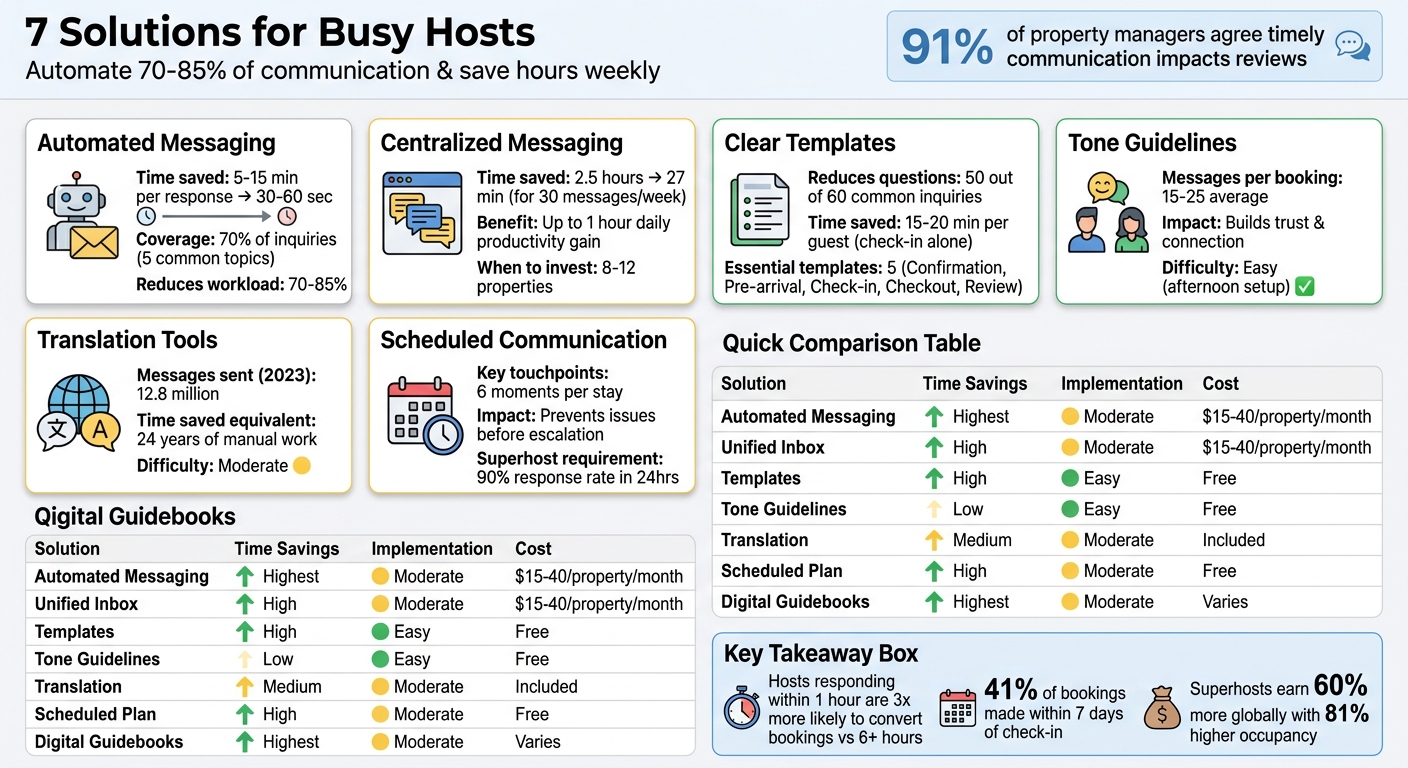
7 Guest Communication Solutions for Vacation Rental Hosts: Time Savings and Implementation Guide
Mastering Guest Communication in Short-Term Rentals | Property Management Masterclass Episode 4
sbb-itb-ec91689
Problem 1: Slow Response Times Cost You Bookings
When potential guests are comparing multiple listings, response time can make or break a booking. A host who replies within an hour is far more likely to secure the reservation, while a delay of six hours could mean losing out entirely. With 41% of bookings made within just seven days of check-in, quick communication isn’t just helpful - it’s critical. Guests making last-minute plans need fast answers, and delays can send them elsewhere.
The numbers don’t lie: Hosts who respond within one hour are three times more likely to convert inquiries into bookings compared to those who take six hours or more. And it’s not just about losing individual bookings - slow responses can hurt your standing on platforms like Airbnb, which requires a 90% response rate within 24 hours to maintain Superhost status. Both Airbnb and Vrbo also reward responsiveness with better search rankings and badges like "Guest Favorite". Fall behind, and your listing could drop in visibility, reducing your chances of being seen by potential guests.
Managing multiple properties only intensifies this issue. If you’re juggling 10 listings, simply keeping up with guest messages can eat up 2 to 3 hours of your day. Plus, 35% of inbound messages revolve around repetitive topics like check-in logistics (door codes, parking details, directions). Without an efficient system, you’re stuck either constantly monitoring your phone or watching opportunities slip through your fingers. The solution? Implementing an automated messaging system.
Solution: Set Up Automated Messaging Tools
Automated messaging tools can transform how you handle guest communications. Around 70% of guest inquiries focus on just five common topics: Wi-Fi passwords, check-in codes, parking details, early check-in requests, and local recommendations. Tools like Hospitable, Hostaway, and Hostrexa allow you to send pre-written responses 24/7. For example, booking confirmations can be sent instantly, check-in instructions 24 hours before arrival, and checkout reminders on the morning of departure. AI-powered tools like Besty AI and HostAI take it further by interpreting guest questions and drafting replies tailored to your property details.
Save time with a draft-and-approve system. AI-generated replies can be reviewed in 30–60 seconds, compared to the 5–15 minutes it usually takes to craft a manual response. This approach ensures you maintain control over messaging while significantly speeding up your response time.
"Response speed is a sales tool." - Hostrexa Team
Automation doesn’t have to feel impersonal. By using shortcodes (or merge tags), you can personalize messages with the guest’s name, your property’s nickname, or specific details like door codes. This simple step can reduce follow-up questions by 40%. Faster responses paired with a personal touch create a better overall experience for your guests.
Focus on automating the 9 essential messages every booking needs: inquiry responses, booking confirmations, onboarding links, pre-arrival details, check-in instructions, mid-stay check-ins, checkout reminders, review requests, and direct-booking follow-ups. Automating these touchpoints can reduce your messaging workload by 70% to 85%. For hosts managing multiple properties, this can mean the difference between being overwhelmed by repetitive tasks or reclaiming your evenings for yourself.
Problem 2: Guest Messages Scattered Across Multiple Platforms
Jumping between Airbnb, Vrbo, email, and SMS wastes time and complicates communication. Managing just 10 active reservations across different platforms can eat up more than 5 hours weekly due to unnecessary back-and-forth. The solution? A centralized messaging system that simplifies and streamlines communication.
Missed messages can cost you bookings. If an inquiry slips through the cracks while you're busy monitoring another platform, potential guests may move on to a host who responds faster. This is especially critical for last-minute bookings - guests looking to stay within the week expect immediate replies. Without constant monitoring across all channels, you're likely losing revenue.
Disorganized communication leads to guest confusion. When you're juggling multiple platforms while fatigued, mistakes like typos or incomplete instructions are bound to happen. These errors often result in frustrated guests and last-minute calls for clarification.
"Each platform is optimized for the guest experience on that platform, not for your operational efficiency. Airbnb wants you in their app. Vrbo wants you in theirs. Neither cares that you're managing both." - Prayas, STR Specialist
The data doesn't lie: Handling 30 messages per week manually takes about 2.5 hours. With an automated system, that time drops to just 27 minutes. For hosts managing multiple properties, consolidating communication is a game-changer.
Solution: Consolidate Messages in One Central Platform
Centralizing your messages eliminates inefficiencies. A unified inbox gathers all your communications - Airbnb, Vrbo, email, and SMS - into one dashboard. Instead of toggling between platforms, you can view and respond to everything in one place. Replies are synced back to the original channel, ensuring no inquiries get overlooked and saving you from endless tab-switching.
The benefits are immediate. By cutting out constant context-switching, hosts can reclaim up to an hour of productivity every day. Plus, maintaining a fast response rate through a unified system boosts your visibility on platforms like Airbnb and Vrbo, where response speed influences search rankings.
Mistakes become far less likely. With multiple properties, it’s easy to send the wrong Wi-Fi password or parking information to a guest. A unified inbox solves this by displaying guest profiles, reservation details, and property specifics alongside the message. This ensures you always have the right information at your fingertips. Features like internal notes also help teams coordinate without accidentally sharing private details with guests.
When should you invest in a unified inbox? Once you're managing 8 to 12 properties, manual messaging becomes unmanageable. Entry-level systems with unified inbox capabilities cost around $15–$40 per property per month. For larger portfolios, AI-powered messaging platforms capable of handling up to 100 properties cost about $199 monthly. Compare that to the $1,350 monthly expense of hiring a virtual assistant, and the savings are clear.
Problem 3: Unclear Messages Lead to Guest Frustration
Confusing instructions frustrate guests before their stay even begins. Imagine a guest searching through a long message to find the door code or receiving conflicting parking details across different platforms. These moments of confusion can sour their experience right from the start and often lead to lower star ratings.
Why does this happen? Errors often stem from repetitive manual entries, which can result in outdated or incorrect details like old door codes or Wi-Fi passwords. Inconsistencies across platforms are another common issue - guests might find one set of house rules on Airbnb and a completely different version in their email. These mistakes can harm your reputation, and since 84.21% of guests consider reviews and ratings the second most important factor when choosing a rental (just behind location at 89.47%), the stakes are high.
Unclear communication also creates more work for you. When guests can’t find what they need, they reach out with follow-up questions, leading to what many hosts describe as a "flurry" of messages. This added workload not only eats into your time but also contributes to burnout. Worse, unclear or incomplete information about amenities or house rules can lead to unmet expectations, negative reviews, and a loss of trust in your ability to manage the property.
Solution: Create Clear Templates and Practice Active Listening
Standardized templates are the first step to solving these issues. By using personalized templates with variables like [GUEST_NAME] and [CHECK_IN_DATE], you can ensure accuracy while keeping the tone friendly and inviting. Breaking down information into clear, easy-to-read sections can drastically reduce guest questions. For example, if you manage 20 guests per month, well-designed templates could eliminate up to 50 out of the 60 common inquiries about parking, Wi-Fi, and amenities.
The way you communicate matters. Avoid slang, idioms, or overly complex words that might confuse international guests. Simple, straightforward language helps build trust and reduces misunderstandings. Use active voice to make your messages sound direct and approachable - “I’ll provide the keys at 3:00 PM” is much clearer than “The keys will be provided.” Regularly review your templates, especially after property updates, to keep them accurate. For tasks that might be tricky, like operating a specific thermostat, including visual aids can make all the difference.
Beyond templates, active listening helps guests feel valued. When a guest reaches out with an issue, acknowledge it specifically before offering a solution. For instance, you could say, “It sounds like you’re having trouble with the coffee maker. Is that correct?” This approach shows you’re paying attention and helps avoid misunderstandings. Use empathy in your responses and provide clear, actionable solutions. The RASA framework - Receive (pay full attention), Appreciate (acknowledge), Summarize (restate the issue), and Ask (clarify if needed) - is a helpful guide for handling guest concerns effectively.
Set up five essential templates to streamline communication: Booking Confirmation (sent immediately), Pre-Arrival (3 days before check-in), Check-In Day (1-2 hours before arrival), Checkout Reminder (on the morning of departure), and Review Request (12-24 hours after checkout). Each template should address specific needs at each stage. For instance, pre-arrival messages should include directions and parking details, while check-in messages should provide door codes and Wi-Fi information. Automated check-in instructions alone can save 15-20 minutes per guest.
Problem 4: Written Messages Lack Tone and Warmth
Text messages often feel cold and impersonal. A straightforward note like "Check-in is at 3:00 PM. Door code: 1234" might get the job done, but it can come across as detached. Without non-verbal cues - like tone of voice or facial expressions - written communication can unintentionally feel robotic. What you mean as helpful might be interpreted as curt or unkind.
Guests pick up on transactional communication. If your messages skip personal touches - like using the guest's name or addressing specific needs (e.g., traveling with kids) - the interaction can feel generic. This lack of warmth might even reinforce the idea that short-term rentals provide "hotel prices without hotel service". Adding a thoughtful tone not only makes your messages feel more human but also pairs nicely with the clarity that templates bring.
Tone missteps can create unnecessary tension. Overusing technical terms or slang can confuse international guests who rely on translation tools. Even frequent, well-meaning check-ins can feel intrusive, making guests question the professionalism of your service. And if you respond to issues without showing empathy, small problems can quickly escalate into bigger complaints.
Solution: Establish Tone Guidelines for Guest Messages
Clear templates are essential, but tone builds trust and connection. Maintain a consistent voice - perhaps warm and approachable - while adjusting your tone based on the situation. Think of your voice as your overall personality, while tone reflects the mood you adopt in specific scenarios. For example, a booking confirmation should sound upbeat and reassuring, while addressing a complaint calls for a calm, empathetic tone. Studies suggest that tailoring tone based on factors like humor or formality significantly influences how guests perceive your messages.
Develop a "voice bible" for your property. Start with a few sentences that describe how you want to sound (e.g., "friendly, clear, slightly playful, but never overly formal"). Then, outline common scenarios and assign appropriate tones - for instance, enthusiastic for check-in day, straightforward for checkout instructions, and serious for safety communications. Include specific guidelines like "Use contractions to sound conversational" or "Avoid industry jargon" to ensure consistency across all communications.
| Tone Dimension | When to Use Extreme A | When to Use Extreme B |
|---|---|---|
| Formality | Formal for rental agreements | Casual for welcome notes |
| Humor | Serious for safety instructions | Light and fun for local tips |
| Respect | Always respectful for complaints | Never irreverent |
| Enthusiasm | Neutral for checkout tasks | Excited for check-in messages |
Personal touches make automation feel human. When guests have complaints or special requests, acknowledge their concerns before offering solutions.
Rachel Yanez from Beyond shares, "When high-maintenance guests send you a flurry of messages or requests, it's important to respond with empathy and patience".
Prioritize key details upfront. Include essentials like door codes and Wi-Fi passwords in the first two lines so guests can access them quickly. With each booking generating 15 to 25 messages on average, nailing the right tone in your templates can save time while making guests feel genuinely valued.
Problem 5: Language Barriers with International Guests
International guests often face challenges understanding critical details. When key information - like checkout times, safety instructions, or how to operate appliances - isn't in their native language, misunderstandings are almost inevitable. This can lead to frustration, negative reviews, or even safety risks. Imagine a guest missing the location of the fire extinguisher or struggling to figure out the heating system - it’s not just inconvenient, it can be dangerous.
Translation errors only add to the confusion. Phrases like "the key is under the mat" can translate too literally, leaving guests puzzled - especially when you're talking about something like a lockbox or smart lock system. Miscommunication often results in guests asking follow-up questions or, worse, making incorrect assumptions. In some cases, this can lead to property damage or missed deadlines, like late checkouts.
Manually translating messages isn’t practical for busy hosts. Using tools like Google Translate for every guest takes too much time, especially if you’re managing multiple bookings across platforms like Airbnb, Vrbo, and Booking.com. Switching between apps and platforms quickly becomes overwhelming and inefficient.
Solution: Use Translation Tools and Multilingual Templates
Automated translation and multilingual templates can solve these issues. Many hosting platforms now offer tools that automatically detect a guest's language and deliver the right template. For example, when a guest views your listing or sends their first message, the system identifies their preferred language and sends pre-written responses accordingly. This ensures that critical information - like check-in instructions, house rules, and emergency procedures - reaches guests in their native language without requiring extra effort from you. In 2023 alone, automated messaging platforms sent 12.8 million messages for hosts, saving the equivalent of 24 years of manual work.
Prepare multilingual templates for your most-used communications. Draft versions of your essential messages - such as booking confirmations, check-in instructions, mid-stay updates, and checkout details - in the languages your guests are most likely to speak. Use dynamic fields to personalize these messages with details like the guest’s name and booking dates, so they feel tailored rather than generic. Always set a fallback language (usually English) to prevent issues with incomplete or unclear translations. To ensure accuracy, keep your language straightforward and avoid slang or idioms that automated tools might misinterpret. For particularly important information, double-check translations to ensure clarity and precision.
Problem 6: Waiting for Guests to Report Problems
After ensuring clear, multilingual communication, the next challenge is moving from a reactive approach to a proactive one.
Relying on guests to report issues means you’re constantly fixing problems as they arise. If you manage more than 10 properties, this can add 2–3 extra hours to your day just addressing guest-initiated messages. That’s valuable time you could use to grow your business or enjoy the flexibility hosting is meant to offer.
By the time guests report an issue, their experience is already impacted. These unresolved problems can quickly lead to negative reviews, which harm your property’s reputation in the long run. And don’t forget, Airbnb’s Superhost requirements demand a 90% response rate within 24 hours. Leaving guests to handle every concern themselves not only makes them feel neglected but also places the responsibility for managing their stay squarely on their shoulders.
Solution: Build a Scheduled Communication Plan
Take the initiative by anticipating guest needs at six key moments during their stay: send a booking confirmation right away, a pre-arrival message three days before check-in, a check-in message on arrival, a mid-stay check-in halfway through their trip, a pre-checkout reminder the evening before departure, and a post-checkout follow-up 1–3 days after they leave. This proactive strategy minimizes problems, improves guest satisfaction, and boosts both your review scores and operational efficiency.
"This shifts you from reactive firefighting to proactive management. It prevents frustration and secures higher ratings."
– Esther Flak, Head of Product Marketing and Customer Marketing Insights, Guesty
A mid-stay check-in - simply asking, "How is everything going?" - offers a chance to resolve concerns before they escalate. This small step can prevent issues from turning into public complaints and negative reviews. In 2023, automated messaging platforms helped hosts send 12.8 million messages, saving the equivalent of 24 years in manual messaging time. Plus, 91% of property managers agree that timely, proactive communication has a direct impact on guest reviews.
Combine your scheduled communication plan with a digital guidebook that provides essential information like Wi-Fi details, appliance instructions, house rules, and emergency contacts. This allows guests to find answers independently, reducing repetitive questions. With tools like Howard's digital guidebook platform, you can create a single shareable link or QR code that consolidates property details, local tips, and FAQs. Guests can access everything they need while you focus on the 5% of messages that require your personal attention. This approach not only prevents potential crises but also sets the stage for addressing repetitive inquiries in the next solution.
Problem 7: Answering the Same Questions Over and Over
Even with a solid communication plan, many hosts find themselves stuck in a loop, answering the same guest questions repeatedly.
Think about it: how often do you have to resend the WiFi password, explain check-in instructions, or guide someone on how to adjust the thermostat? These questions aren’t the issue - it’s the manual effort of responding to them every time. Important details can also get buried in long, scattered messages, making the process inefficient for both you and your guests.
Some of the most common repetitive questions include:
- Check-in and check-out details
- WiFi credentials
- How to use appliances like heaters or hot water systems
- Parking instructions
- Local dining or activity recommendations
If you manage multiple properties, this time drain multiplies quickly. And let’s not forget the pressure to maintain a 90% response rate within 24 hours to keep your Airbnb Superhost status. Typing out the same WiFi password for the tenth time in a month isn’t just tedious - it’s time you could spend improving your listings, managing new bookings, or simply relaxing.
But here’s the kicker: the cost isn’t just your time. Superhosts enjoy an 81% higher occupancy rate and typically earn 60% more globally compared to non-Superhosts. Every minute spent on repetitive questions is a missed opportunity to focus on what really matters.
Solution: Use Digital Guidebooks and Automated FAQs
The fix? Create a single, organized resource that answers all these common questions - a digital guidebook. This shareable link gives guests instant access to everything they need, even before they ask.
Here’s how to make it work:
- Prioritize key info: Place your WiFi network name and password at the top of the guidebook since it’s the most frequent request.
- Add visuals: Use step-by-step photos for tricky tasks like opening a lockbox, adjusting the thermostat, or figuring out a complicated TV remote. A simple picture with circled buttons can save everyone a lot of frustration.
- Automate responses: AI tools can respond to keywords like "WiFi" or "parking" automatically. For example, one host set up an automated reply for seasonal pool hours. When guests asked, they’d instantly receive a detailed message with the hours, location, and a disclaimer about seasonal availability.
For messages that need a personal touch, pre-saved templates can be a lifesaver. For instance, you could have a template ready with walking directions to nearby beaches, parking tips, or even driving routes to popular spots.
AI-powered guest messaging tools can handle up to 90% of routine inquiries without you lifting a finger. That means you can shift your focus to the questions that genuinely need your attention, transforming you from a reactive responder into a proactive host who anticipates guest needs.
Comparison: Evaluating the 7 Solutions for Busy Hosts
Building on the strategies outlined earlier, let's see how these solutions measure up in terms of saving time, cutting costs, and supporting business growth.
The seven strategies tackle common guest communication challenges well. But which ones offer the best bang for your buck? Let’s break it down.
Time savings is where automation shines brightest. Automated messaging and digital guidebooks take care of repetitive questions without any effort from you, saving you tons of time by addressing tasks instantly. Templates also help shave off hours, especially during busy turnover days when you're crafting responses. On the other hand, tone guidelines, while helpful for maintaining consistent branding, won’t significantly lighten your workload at first. Beyond time savings, the ease of getting these solutions up and running also matters.
Implementation difficulty varies across the board. Templates and tone guidelines are the simplest to create - you can whip them up in an afternoon without needing any fancy tools. Digital guidebooks and scheduled communication plans require a bit more effort, as they often involve integrating them with your property management system. Translation tools can also be moderately challenging, depending on whether you’re using built-in platform features or third-party apps. And of course, keeping costs in check is another key factor for busy hosts.
Cost is minimal for most of these solutions. Templates, tone guidelines, and scheduled plans are virtually free to set up. A basic automation setup - which might include a property management system (PMS), smart lock integration, and onboarding tools - typically costs between $15 and $40 per property per month. This small investment can save you hours each day that would otherwise be spent on manual messaging.
Scalability becomes essential as you grow your portfolio. Automated messaging, unified inboxes, and digital guidebooks scale effortlessly - whether you’re managing two properties or twenty. Templates work well for smaller portfolios but can become trickier to maintain as your business expands.
"Sticking to native messaging for every channel is a trap. You'll spend more time switching platforms than responding to guests".
The scheduled communication plan also stands out here - it’s often credited with driving more 5-star reviews than any other automation tool. By addressing issues proactively, it ensures problems are resolved before they escalate. These comparisons highlight the efficiency gains each solution brings to the table.
Conclusion
Managing guest communication doesn't have to take over your evenings and weekends. The seven solutions discussed here tackle the biggest hurdles hosts face - like scattered messages, slow replies, repetitive questions, and even language barriers. Together, they create a streamlined approach to communication.
The key is to treat these strategies as parts of a larger system, not as standalone fixes. Start by using a Property Management System to centralize your messaging. Then, implement automated templates to handle the routine 80% of guest inquiries. Digital guidebooks can address FAQs, while scheduled check-ins help you proactively resolve potential issues before they lead to negative reviews. Instead of constantly putting out fires, you’ll be running a smoother, more efficient operation.
By cutting down on manual tasks and improving response times, these strategies deliver clear benefits. A well-executed communication system can reduce your messaging time by 70% to 85%. That’s not just a time-saver - it also boosts booking conversions, as hosts who respond within an hour see much better results. Plus, timely communication plays a huge role in guest satisfaction, with 91% of property managers agreeing it directly impacts reviews.
As Bart wisely put it: "Automate the predictable, personalize the unexpected".
Use automation for routine tasks like booking confirmations, check-in instructions, and Wi-Fi details. Save your personal touch for complaints, special requests, or moments that call for genuine hospitality.
FAQs
What should I automate first without sounding robotic?
Start with automating the messages guests expect most, like pre-arrival instructions, check-in details, and checkout reminders. These routine touchpoints are perfect for automation because they’re predictable and ensure communication stays consistent and on time. To keep things warm and engaging, craft templates with a friendly, personalized tone. This way, your guests feel appreciated, and you get to save time without sacrificing the human touch.
How do I keep messages accurate across multiple properties?
Using automated messaging tools and property management systems can transform how you handle guest communication. These platforms allow you to set up templates and automations, ensuring your messages remain consistent across all properties while reducing the chance of mistakes.
AI-powered tools take it a step further by crafting replies that feel personalized yet maintain uniformity, striking the perfect balance between efficiency and a human touch. Plus, managing all guest interactions from a single dashboard makes it easier to streamline communication and keep property details accurate and up-to-date.
What should a digital guidebook include to cut guest questions?
A digital guidebook serves as a handy resource for guests, offering clear and detailed information to address common questions before they even arise. It should cover essential details such as:
- Property features: Highlight amenities, Wi-Fi details, parking instructions, and anything else guests might need to know about the space.
- Check-in and check-out procedures: Provide step-by-step instructions, including key codes, times, and any special requirements.
- Local attractions: Share recommendations for nearby restaurants, activities, and must-see spots to help guests make the most of their stay.
- House rules: Outline expectations for noise levels, smoking policies, pet guidelines, and other critical rules.
By proactively including this information and leveraging automation, you can minimize repetitive questions and create a smoother, more enjoyable experience for your guests.