Vacation Rentals
QR Code vs Printed Guidebook: Best Option for Rental Hosts
QR Code vs Printed Guidebook: Best Option for Rental Hosts
When hosting rental properties, sharing essential information like WiFi passwords, appliance instructions, and local tips can enhance your guests' experience. But what’s the best way to present this information - QR codes or printed guidebooks? Here’s a quick summary:
- QR Codes: Offer instant updates, cost less over time, and can be shared before arrival. They require guests to have a smartphone and internet access.
- Printed Guidebooks: Always accessible, don’t rely on technology, and provide a personal touch. However, they’re costly to update and can wear out over time.
Key Takeaway: QR codes work well for tech-savvy guests and properties with reliable internet. Printed guidebooks are better for rural areas or guests less comfortable with technology. Many hosts find success using both - a QR code for detailed digital guides and a printed quick-reference card for offline use.
Quick Comparison:
| Feature | QR Codes | Printed Guidebooks |
|---|---|---|
| Cost | Low initial, minimal updates | Moderate initial, high updates |
| Updates | Instant, online | Requires reprinting |
| Accessibility | Needs smartphone/internet | Always available, offline |
| Guest Preference | Modern, efficient feel | Personal, welcoming feel |
| Durability | Not applicable | Can wear out or get lost |
Your choice depends on your property type, guest demographics, and how often you need to update information.
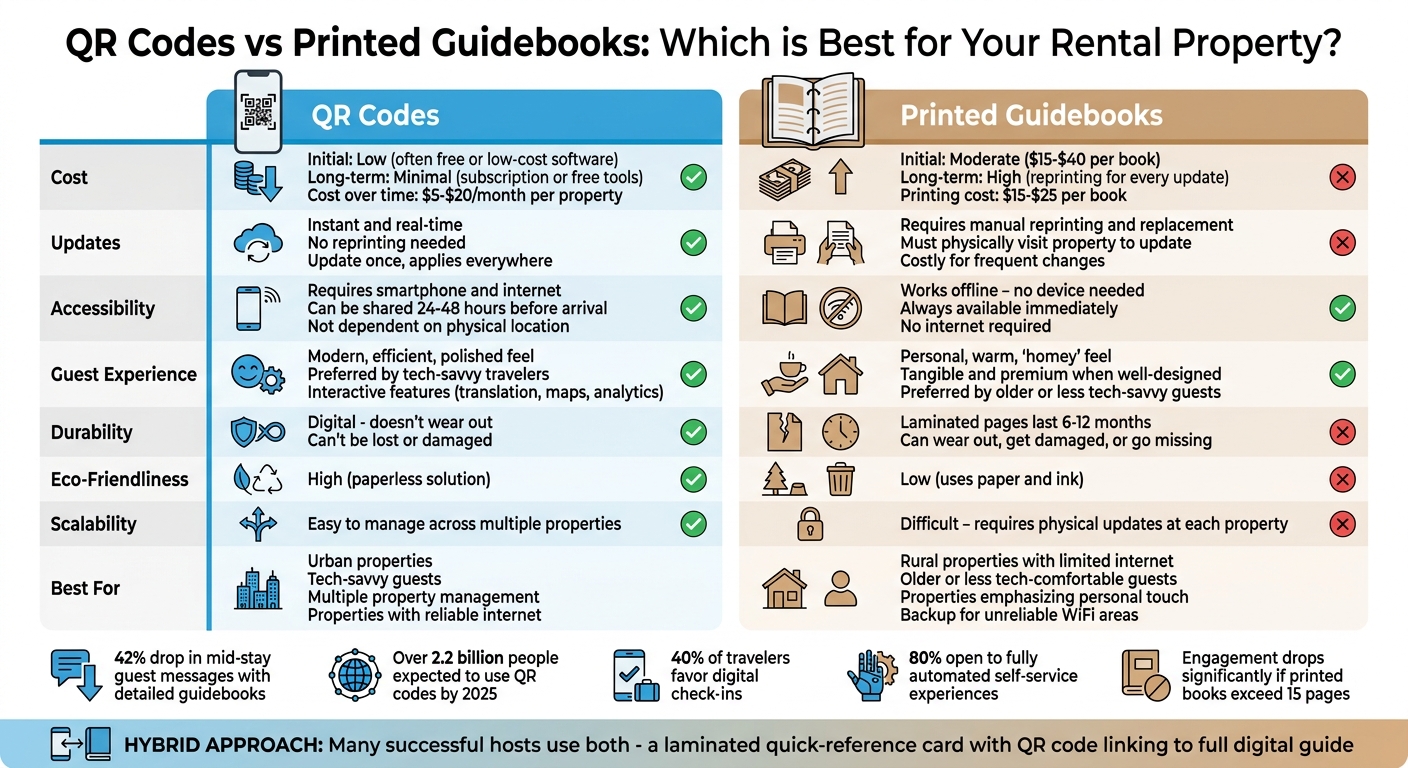
QR Codes vs Printed Guidebooks for Rental Properties Comparison Chart
Create Your Own Vacation Rental Welcome Book
sbb-itb-ec91689
What Are QR Codes for Rental Guidebooks?
A QR code is that small, square pattern you’ve probably seen on menus or boarding passes. It connects the physical world to digital content. For vacation rentals, it’s a simple way to guide guests to a mobile-friendly guidebook. All they need to do is point their phone’s camera at the code - no extra apps or typing in URLs.
By 2025, over 2.2 billion people worldwide are expected to use QR codes. Travelers are already familiar with them, making QR codes a natural addition to vacation properties.
Howard’s platform takes this a step further by creating dynamic QR codes for each property. What makes them dynamic? You can update the guidebook’s content - like swapping out a WiFi password or adding a new restaurant suggestion - without needing to reprint the QR code itself. The printed code doesn’t change, but the information it links to stays up to date.
"A QR code in the kitchen is useful the exact moment the guest is standing there wondering how to work the coffee machine." - Bart, GuestIntro Team
Let’s break down how these codes work and where to place them for the best results.
How QR Codes Work
Using a QR code is straightforward. Guests simply scan the code with their phone’s camera, which detects the pattern and opens a browser link. With one tap, they’re in your guidebook. This quick access is a lifesaver when guests need immediate answers - whether it’s the WiFi password, a guide to recycling, or instructions for operating the coffee machine.
You can even create specialized QR codes for specific areas of your guidebook. For example:
- Place a QR code near the dishwasher that links directly to its user manual.
- Add one by the TV to guide guests through your streaming setup.
This approach saves guests from digging through the entire guidebook when they just need one quick answer. The key is making these codes easy to find and scan.
Creating and Displaying a QR Code
Howard’s platform simplifies the process by generating high-resolution QR codes for download. Once your guidebook is ready, you can print the code. For best results:
- Minimum size: 2 x 2 inches (5 x 5 cm) for close-range scanning.
- Larger size: 4 x 4 inches for wall-mounted or distant scanning.
Placement is just as important as size. Put QR codes where guests naturally look for information, like:
- On the entryway table.
- Next to the coffee maker in the kitchen.
- Beside the TV in the living room.
Make sure the purpose is clear with labels like “Scan for WiFi & House Guide.” Before your guests arrive, test the code on both iPhone and Android devices under the room’s lighting. This ensures a smooth experience.
For a polished look, consider framing the code or using laminated cardstock. It’s a small touch that shows attention to detail.
| Placement Area | Recommended Information to Link |
|---|---|
| Entryway | Welcome message, check-in instructions, WiFi details |
| Kitchen | Coffee maker guide, dishwasher instructions, recycling rules |
| Living Room | TV setup, smart home controls |
| Bedrooms | Local dining recommendations, alarm clock instructions |
| Exit Door | Check-out checklist, review link |
What Are Printed Guidebooks for Rental Properties?
A printed guidebook is a physical resource packed with all the important details guests might need during their stay - think house rules, WiFi passwords, how-to guides for appliances, emergency contacts, and even local tips. Unlike digital guides that require a device, a printed guide is always accessible, sitting right there on the counter or table, ready to be flipped through.
These books add a touch of professionalism and a premium feel to your rental. Guests who prefer to disconnect from their devices - or those who don’t have easy access to the internet - will appreciate having all the information in one place, no screens required.
"Physical welcome books are tangible and premium-feeling when well designed - a quality binder or printed booklet signals professionalism." - StayStrat
Printed guidebooks are also incredibly practical in properties with unreliable WiFi or for international guests who might not have active data plans. In fact, hosts who provide detailed guidebooks report a 42% drop in mid-stay guest messages. That said, keeping the guide concise is key - engagement drops significantly if the book exceeds 15 pages.
Creating a Printed Guidebook
If you’re ready to create a guidebook, tools like Canva can make the process simple. They even offer free templates specifically for vacation rentals, though upgrading to the premium version (around $13 per month) can unlock extra design features. Start by organizing the content with a clear table of contents to make navigation easy for your guests.
Kick things off with the essentials: the property address and WiFi password in bold, easy-to-read text. Follow up with emergency contacts (like the nearest hospital and fire department), house rules, check-in and check-out times, and step-by-step instructions for operating appliances and entertainment systems.
For durability, consider printing on high-quality cardstock or using laminated pages. Laminated pages can last 6 to 12 months, making them a great choice for high-traffic rentals. If you prefer flexibility, a binder setup allows you to update specific sections - like seasonal rules or restaurant recommendations - without reprinting the entire guide.
Expect professional printing to cost between $15 and $25, with total expenses for a guidebook ranging from $15 to $40. To keep your guidebook current, schedule quarterly updates to refresh information like WiFi passwords or local business hours.
Where to Place Your Printed Guidebook
Once your guidebook is ready, where you place it matters. The kitchen counter is a popular spot since it’s a central area guests naturally gravitate toward. Setting it next to the coffee maker ensures it’s seen first thing in the morning, while placing it on an entryway table provides instant access when guests arrive. Positioning it at eye level in a well-lit spot can also boost visibility.
To go the extra mile, consider including the guidebook in a welcome basket with local snacks - it’s a small touch that leaves a big impression. For more specific instructions, like how to use the hot tub, you could add smaller laminated cards near the appliance itself for quick, on-the-spot guidance.
QR Codes vs Printed Guidebooks: Comparison
QR codes and printed guidebooks each bring their own strengths and challenges when it comes to providing information to guests. QR codes shine in terms of flexibility and ease of updates. For example, if you change your WiFi password, QR codes allow you to update the information online, ensuring all guests get the latest details instantly. On the other hand, printed guidebooks are completely offline, making them available immediately upon arrival without the need for a device or internet connection. Over time, digital guidebooks tend to be more cost-effective since they eliminate the need for reprints whenever details change. However, printed guides can become expensive, especially if you're managing multiple properties or updating frequently. Below, we break down the pros and cons of each option.
QR Codes: Benefits and Drawbacks
QR codes are all about convenience and adaptability. They are paperless, making them an environmentally friendly choice, and are easy to manage across different locations. Dynamic QR codes, in particular, let you update the linked content without needing to reprint the physical code - print it once, and you're done.
However, there are some challenges. QR codes require guests to have a smartphone and internet access. If your property has unreliable WiFi, this could frustrate some visitors. Additionally, older guests or those less comfortable with technology might struggle with digital-only solutions. Placement matters too - codes printed on low-quality materials or placed in dimly lit areas can be hard to scan.
Here’s a quick look at the key features of QR codes and digital guidebooks:
| Feature | QR Code / Digital Guidebook |
|---|---|
| Initial Cost | Low (often free or low-cost software) |
| Long-term Cost | Minimal (subscription or free tools) |
| Updates | Instant and real-time |
| Accessibility | Requires smartphone and internet |
| Guest Feel | Efficient, polished, and modern |
| Eco-Friendliness | High (paperless) |
| Scalability | Easy to manage across multiple properties |
Printed Guidebooks: Benefits and Drawbacks
Printed guidebooks, while less modern, remain a reliable option. They don’t depend on technology, making them accessible to all guests regardless of age, tech skills, or internet availability. For guests who want to unplug or for international travelers without data plans, printed guides offer a tangible, all-in-one resource.
"A printed guide says, 'We thought this through.' It feels intentional, like a host who left snacks on the counter." - PMI Northwoods
That said, printed guidebooks come with their own set of challenges. They can wear out, get damaged, or even go missing. Updates are cumbersome - any change to details like house rules or local recommendations means printing a whole new batch. Plus, the ongoing costs of high-quality materials can add up, especially for hosts managing multiple properties. Unlike QR codes, printed guides also can’t be shared with guests ahead of their arrival.
Here’s a snapshot of the features of printed guidebooks:
| Feature | Printed Guidebook |
|---|---|
| Initial Cost | Moderate (printing, binding, materials) |
| Long-term Cost | High (reprinting for every update) |
| Updates | Requires manual reprinting and replacement |
| Accessibility | Works offline; no device needed |
| Guest Feel | Personal, warm, and "homey" |
| Eco-Friendliness | Low (uses paper and ink) |
| Scalability | Difficult; requires physical visits to update |
How to Choose the Right Option for Your Property
Selecting the best option depends on factors like your guests' preferences, internet availability, and how often updates are needed. For instance, urban properties catering to tech-savvy travelers have different requirements than rural getaways with unreliable Wi-Fi. The decision should reflect both your guests' expectations and the specific challenges of your property's location.
Budget and update frequency are also key considerations. Digital platforms typically cost between $5 and $20 per month per property, while printed guidebooks may have an upfront cost of $15 to $40 - and you'll need to reprint them whenever you update details like Wi-Fi passwords or local tips. Here’s a breakdown of when QR codes or printed guidebooks might be the better fit.
When QR Codes Work Best
QR codes and digital guidebooks shine in properties with tech-savvy guests, especially in urban areas, or for hosts juggling multiple listings. Sending a digital guide 24 to 48 hours before check-in allows guests to review important details, like check-in instructions, and plan their stay ahead of time. Plus, digital platforms offer features that printed materials simply can’t match - like automatic translation for international travelers, interactive maps, and analytics on guest engagement.
"Guests rarely read printed booklets. They pick up their phone instead - so meeting them there makes a real difference."
– Dimtiris0, Web Design Agency Owner
For hosts managing multiple properties, digital updates make life much easier. Platforms like Howard let you make instant updates across all your listings. Whether it’s adjusting house rules or recommending a new local spot, your guests will always have the most current information. For those prioritizing efficiency and scalability, digital solutions are the way to go.
When Printed Guidebooks Work Best
Printed guidebooks are ideal for rural properties with limited internet, for guests who prefer tangible materials, or when you want to add a cozy, personal touch. They’re dependable regardless of Wi-Fi strength or battery life, making them perfect for remote locations like cabins, mountain retreats, or beach houses with spotty connectivity. For older or less tech-savvy guests, printed guides remove the frustration of navigating digital tools.
Some hosts find success by combining a laminated quick-reference card with a QR code linking to a more detailed digital guide. This hybrid approach offers guests easy access to essential information while keeping the option for more in-depth details. Place the QR code in a well-lit, high-visibility spot - like near the entrance or on the refrigerator - and include clear instructions such as "Scan for Full House Guide" to encourage use.
Conclusion
QR codes and printed guidebooks each bring their own advantages. QR codes offer instant updates, cost efficiency, and easy access, while printed guides provide a reliable, tangible option that some guests may prefer. That said, digital solutions often provide better long-term value for most hosts. With QR codes, you avoid recurring costs for printing materials every time details like your Wi‑Fi password change. Tools like Howard's dynamic QR codes let you update information instantly across all properties without needing to reprint or redistribute anything.
QR codes also address the common issue of misplaced guidebook links, ensuring guests can access key information right from their smartphones. With over 40% of travelers favoring digital check-ins and nearly 80% open to fully automated self-service experiences, digital options align with modern guest preferences. By meeting guests where they are - on their phones - you make their stay more convenient.
"Digital costs less over time. You set it up once and just update as needed. Printed guides cost money every time you run new copies, which adds up if you manage more than one property."
– PMI Northwoods
Still, the best approach depends on your property and audience. For example, rural cabins with unreliable internet or properties catering to older guests might still benefit from having printed materials as a backup. Many hosts find success with a hybrid approach: using a laminated quick-reference card featuring a QR code that links to Howard's full digital guide. This setup combines the dependability of printed materials with the adaptability of digital updates.
When deciding, think about your guest demographics, the stability of your internet connection, and how frequently your information changes. For urban properties or hosts managing multiple listings, Howard's QR code solution strikes a practical balance between cost savings, guest convenience, and operational ease. By blending technology with traditional methods, you can create a guest experience that feels both modern and accommodating.
FAQs
What should I do if guests can’t scan the QR code?
If guests have trouble scanning the QR code, make sure they have another way to access the guidebook. You can share the link through email, pre-arrival messages, or include it in your check-in instructions. For added convenience, think about offering a printed version of the guidebook as a backup. A physical copy doesn’t rely on Wi-Fi and ensures everyone has access, minimizing any potential hassles.
How can I keep guest info available without Wi-Fi?
Making guest information available offline is a smart move, especially for properties with spotty or no internet access. Printed materials like guidebooks or QR codes can make all the difference.
A printed guidebook is a handy option. It can include everything guests need: essential details about the property, clear instructions, and insider tips for exploring the local area. No Wi-Fi? No problem - guests can still access all the information they need.
Another option is printed QR codes. These can link to digital guides, Wi-Fi login details, or other resources. Even though the content lives online, the physical QR code ensures guests can quickly access it when they’re connected.
Both approaches are straightforward and ensure guests feel informed and taken care of, no matter the connectivity situation.
What’s the best hybrid setup for QR codes and print?
The ideal hybrid setup blends printed materials with QR codes, creating a well-rounded experience for your guests. For example, you can place printed guides in key spots like the kitchen or entryway. These guides can include essential information such as house rules or local recommendations.
To complement this, add QR codes that link to detailed digital guides. This way, guests get the best of both worlds: quick offline access to important details and the ability to dive deeper into up-to-date, online resources when needed.