Vacation Rentals
15 Ways to Reduce Guest Messages and Save Time as a Host
15 Ways to Reduce Guest Messages and Save Time as a Host
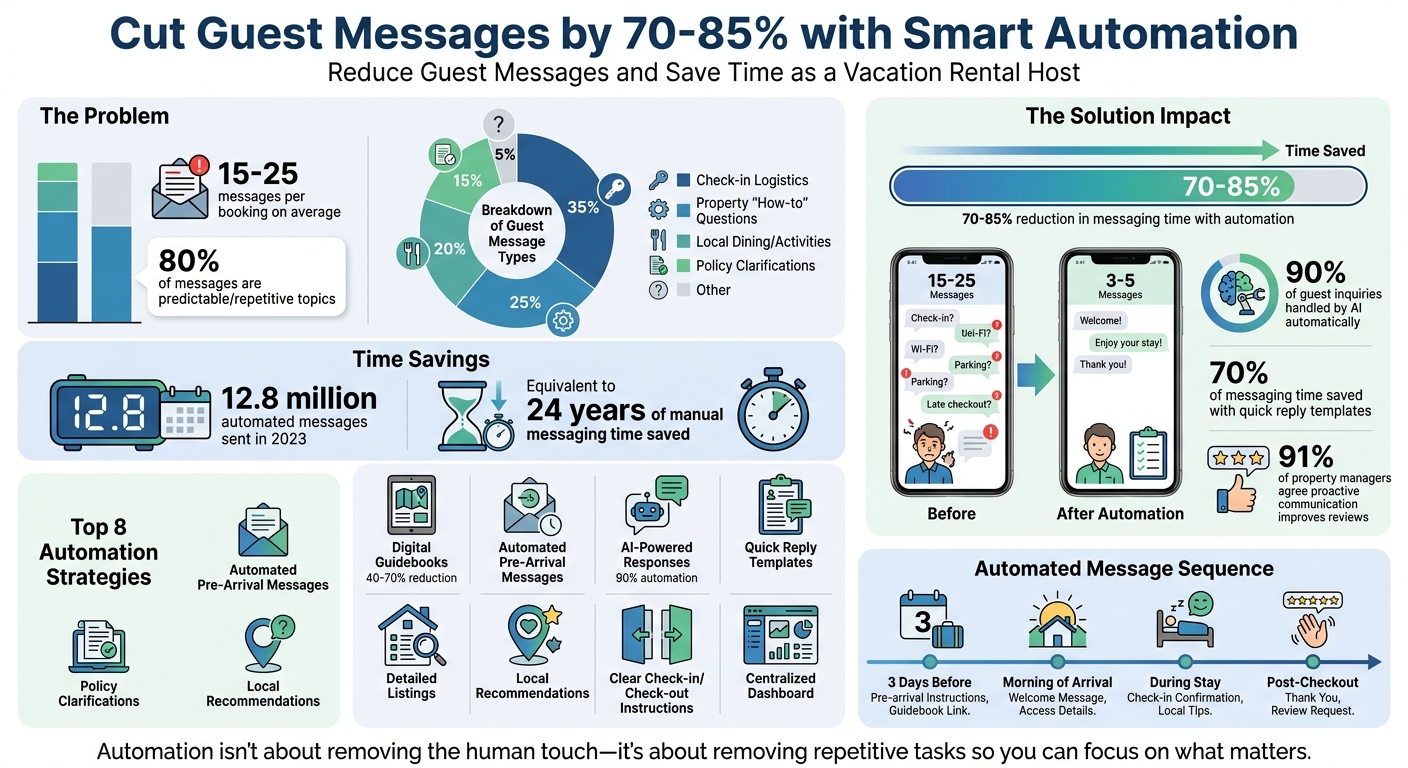
If you’re a vacation rental host, chances are you’ve spent too much time answering repetitive guest questions like “What’s the WiFi password?” or “Where do I park?”. On average, each booking generates 15–25 messages, with 80% of them being predictable topics like check-in details, parking, or thermostat instructions.
The good news? You can cut your messaging time by 70% to 85% by automating routine communications, providing clear instructions upfront, and using tools like digital guidebooks and AI-powered messaging. This approach not only saves time but also enhances the guest experience, leading to better reviews.
Key Strategies:
- Digital Guidebooks: Reduce repetitive questions by consolidating WiFi passwords, check-in steps, and local recommendations in one place.
- Automated Messaging: Schedule pre-arrival and check-in messages to handle common inquiries before they arise.
- AI-Powered Responses: Use AI tools to handle up to 90% of guest inquiries automatically.
- Quick Reply Templates: Save time with pre-written responses for frequent questions.
- Clear Listings: Include detailed property info and house rules upfront to minimize back-and-forth.
- Local Tips: Share dining and activity recommendations before guests ask.
- Streamlined Check-in/Check-out: Provide foolproof instructions with visuals and reminders.
- Centralized Management: Use a unified dashboard to manage multiple properties and platforms.
By implementing these techniques, you’ll simplify hosting, reduce repetitive tasks, and focus on the aspects of hosting that matter most.
Guest Messaging Statistics: How Automation Saves Vacation Rental Hosts Time
10 tips for messaging like a superhost (my setup)
sbb-itb-ec91689
1. Build a Complete Digital Guidebook with Howard
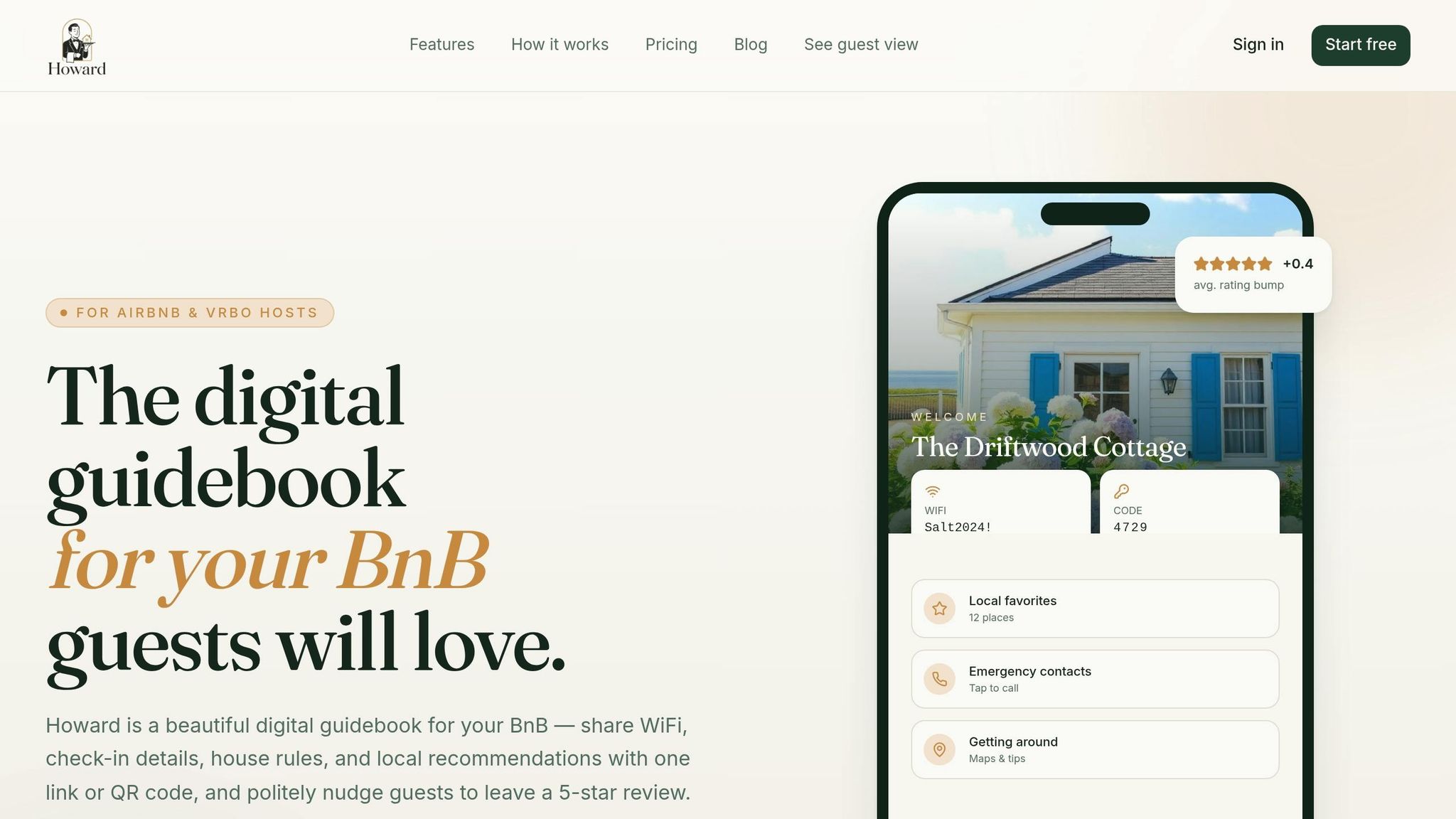
A digital guidebook can significantly cut down on repetitive questions from guests. Properties using digital guidebooks report a 40% to 70% reduction in pre-arrival and mid-stay messaging.
Howard's digital guidebook puts everything your guests need in one place, accessible through a single shareable link or QR code. Make sure to highlight urgent details like the Wi-Fi password and door code right at the top. Did you know that check-in logistics alone account for about 35% of all guest messages, while another 25% are about property "how-to" questions?
Keep instructions clear and visual. Use photos or annotated images to explain things like the lockbox location or how to operate the thermostat. A friendly tone goes a long way - try phrases like, "Feel free to adjust the thermostat to your liking".
To make your guidebook even more helpful, add 5–10 local recommendations. Include specifics like standout dishes at restaurants and their operating hours. This kind of detail can save you from a flood of follow-up questions about where to eat or what to do.
2. Set Up Automated Pre-Arrival Messages
Once you've got your digital guidebook ready, the next step is to automate pre-arrival messages. This simple move can save you a ton of time and reduce the number of repetitive guest inquiries.
Automating these messages can free up about 70% of your messaging time. Since 80% of guest messages are predictable, automation is a no-brainer for efficiency.
Timing matters here. Plan to send two key messages:
- Three days before check-in: Include directions, parking details, and grocery store suggestions.
- Morning of arrival: Share the door code, lockbox location, and entry photos.
This setup helps you stay ahead of last-minute questions and ensures guests feel prepared.
"The single highest-ROI automation to set up first? A scheduled check-in-day message with the door code, sent automatically on arrival morning." - Bart, GuestIntro team
Tools like Howard offer features to make this process seamless. You can create triggers for messages based on events like new reservations or specific check-in times. With over 50 shortcodes available, you can personalize messages by automatically including guest names, Wi-Fi passwords, or check-in details. Plus, smart logic ensures last-minute bookings won’t get unnecessary messages, keeping communication relevant.
Pro tip: Place important details like door codes and Wi-Fi passwords in the first two lines of your message. This way, guests won’t need to scroll to find essential information. By automating these steps, you’ll save time and cut down on follow-up questions significantly.
3. Use Howard's AI-Powered Guest Messaging
Streamline your workflow with AI-driven guest messaging. This technology can manage up to 90% of guest inquiries, building on your pre-arrival automation and taking even more repetitive tasks off your plate.
Howard's AI leverages Natural Language Processing to interpret guest questions, enabling it to respond to over 20 topics. Whether it’s WiFi passwords, parking details, pet policies, or local dining suggestions, the system pulls accurate answers directly from your digital guidebook in the Knowledge Hub. Best of all, it provides real-time responses tailored to each guest's specific needs.
What makes this system stand out is its flexibility. For example, if a guest asks about WiFi before their stay, they might receive information about network speed. But during their visit, the AI will include the actual password and troubleshooting tips. It’s even smart enough to check your booking calendar and handle requests like late check-outs instantly.
You stay in control of the automation. Set the AI to respond 24/7 or review drafted replies with a single tap. For anything outside the AI's scope, the system flags messages that need your personal attention.
"Automating guest communication isn't about turning your rental into a vending machine. It's about quietly removing all the friction from the parts of hosting that don't require your judgment, so you can spend your attention on the parts that do." – Bart, GuestIntro Team
To get started, upload your guidebook and property policies to the Knowledge Hub. Use "review mode" for your first 10–20 bookings to monitor the AI's performance before fully automating the process.
4. Create Quick Reply Templates
While AI can tackle most routine questions, quick reply templates are your go-to for situations that need a bit more of a personal touch. Think of them as pre-written shortcuts - ready to save you time by eliminating the need to type out the same responses over and over.
Consider this: the top 10 most common guest questions often account for 70% of all inquiries. With templates, you can quickly address frequent topics like WiFi details, parking info, or local dining recommendations. Plus, dynamic tags make these messages feel personalized by automatically adding details like the guest's name, check-in date, or your property address.
Howard makes managing these templates simple. Just head to the "Inbox" tab, open any conversation, and click the blue chat bubble to start building your library. You can even assign specific templates to individual properties, ensuring the details are always correct.
To make your templates even more effective, put the most important details in the first two lines so guests don’t have to scroll. For more complex queries, attach photos or videos to clarify instructions. And don’t forget to review and update your templates every three months to include seasonal tips or new house rules.
"I tell the guest that it's an auto message... just in case the response does not answer their unique question... by being transparent about message automation, they're more likely to think that some of my other [canned] messages are personal." – Jason Wolohan, Host
Quick reply templates work hand-in-hand with automated messaging tools, filling in gaps where a personal touch is needed. Together, they ensure guests get fast, accurate responses without adding extra work for you.
5. Add Detailed Property Information to Your Listing
A well-crafted listing can save you from answering the same questions over and over. Think of your listing as your first line of communication - it should anticipate guests' needs and provide clear answers to their most common inquiries. By doing this, you reduce unnecessary back-and-forth while making your property more appealing.
Cover the essentials guests care about. For example, if you offer high-speed Wi-Fi, specify whether it’s fiber or suitable for remote work. Include parking details - is it a driveway, street parking, or does it require a permit? Be specific: instead of just saying "parking available", try something like, "Park in the driveway on the left side." Don’t forget to outline house rules, such as policies on pets, smoking, parties, or minimum stays.
Adding local context is also helpful. Mention precise distances to nearby transit, stores, or attractions. If your property has quirks - like a delay in hot water starting or a thermostat with special instructions - be upfront about these. It helps avoid confusion and reduces messages about "broken" equipment.
"When someone can find the WiFi password, work the heating, and discover a great restaurant all without having to message you, they feel independent and looked after at the same time." – Bart, GuestIntro
Highlight your property's features clearly. If you have a fully-equipped kitchen, a washer/dryer, or standout amenities like a private pool or hot tub, make sure these are included. The more thorough your listing is, the fewer repetitive questions you'll need to answer. This attention to detail works hand-in-hand with automated messaging, creating a seamless and self-sufficient experience for your guests.
6. Share Local Recommendations Before Guests Ask
Did you know that 20% of guest messages are about local dining, groceries, or activities? Instead of waiting for guests to ask where to grab breakfast or find oat milk, take a proactive approach. Send them a curated list of local recommendations three days before check-in. This not only reduces your messaging workload but also sets a friendly and helpful tone for their stay.
Focus on the essentials: nearby grocery stores, a handful of recommended restaurants, and a few local activities worth exploring. Be specific and personal with your suggestions. For instance, instead of saying, "There's a good coffee shop nearby", try something like, "The Daily Grind on Main Street serves fantastic espresso and opens at 6:00 AM - perfect if you're an early riser." This level of detail makes your advice feel personal, like it's coming from a trusted friend, rather than a generic list.
Accuracy is key. Businesses change, hours vary, and nothing frustrates guests more than outdated tips. As Bart from the GuestIntro team points out, "The hallucination rate on specific local details (restaurants, transit, etc.) is higher than most hosts realize". Regularly verify your recommendations to ensure they’re still valid, especially if you’re using AI tools to assist with guest inquiries. Keeping your tips current not only builds trust but also minimizes follow-up questions.
To make things even easier, preload these recommendations into Howard's digital guidebook. Guests can access the guide anytime via a QR code or shareable link, eliminating the hassle of searching through emails. Plus, Howard’s AI-powered messaging can pull directly from your curated list to provide instant, accurate answers to guest questions. A little effort upfront saves you from answering the same “Where should we eat?” question over and over again.
7. Write Clear Check-In and Check-Out Instructions
Clear check-in and check-out instructions can save you a lot of back-and-forth with guests, especially when paired with tools like automated messaging and digital guidebooks.
Did you know that check-in logistics - like door codes, parking details, and lockbox locations - make up 35% of all guest messages? That’s over a third of your inbox taken up by questions you can easily address with well-written instructions.
"Self check-in only works if your instructions are good enough that guests can follow them without help." – Bart, GuestIntro team
Start from the basics: Help your guests locate the property effortlessly. Mention landmarks like house numbers or door colors that stand out. Then, break everything into simple, step-by-step instructions, where each step focuses on just one action. For instance:
- Park in the driveway on the right.
- Walk to the white gate on the left.
- Enter the code: 4 7 2 9.
To make things even easier, provide a Google Maps link along with labeled photos that show the street view, entrance, and key safe or smart lock. Think about worst-case scenarios too, like guests arriving late at night, in bad weather, or with a low phone battery - your instructions should be foolproof even then.
When it comes to checkout, keep it short and straightforward. A friendly list of tasks like “start the dishwasher,” “turn off the A/C,” or “leave the keys on the counter” works much better than overwhelming guests with a long list. Send a reminder the night before checkout and include all details in your digital guidebook so guests can easily refer back to them.
8. Display Emergency Contacts and House Rules Upfront
Sharing emergency contacts and house rules before guests arrive can significantly reduce last-minute, panicked messages. Policy-related questions make up around 15% of inquiries, while "how-to" questions account for another 25%. That's a lot of time spent answering questions that could be addressed with upfront communication.
To streamline this, create a dedicated "Emergency Info" section in your digital guidebook. Include your contact number, the location of the first aid kit, the nearest hospital's address, and basic safety instructions. Share this information in multiple ways: within the booking confirmation, pre-arrival messages, and on-site materials. Elliott Caldwell from Home Team Luxury Rentals emphasizes this point:
"Important details must be communicated clearly and multiple times. A common mistake is assuming guests will read a long welcome email attentively – in reality, concise and repeated reminders work best to prevent confusion".
When it comes to house rules, clarity is key. Use bullet points to highlight essential details like Wi-Fi passwords, parking spots, and noise policies. Avoid hiding critical information in long paragraphs. A printed card with quick references can also be helpful. To make it even easier, consider placing QR codes around the property that link directly to your digital guidebook. This ensures guests can access all the information they need, whenever they need it.
And it pays off. 91% of property managers agree that timely, proactive communication has a positive impact on guest reviews. When guests feel informed and secure, they're less likely to reach out with repetitive questions - and more likely to leave glowing feedback.
9. Turn On Instant Book with Guest Screening
Instant Book simplifies the booking process by letting guests reserve your property instantly, without needing to ask about availability or basic details like pet policies. No more back-and-forth messages like, "Is this weekend open?" or "Can I bring my dog?" - the system handles it for you. But to ensure peace of mind, pairing Instant Book with guest screening is key.
Guest screening tools, like verified IDs, rental agreements, and damage deposit authorizations, add an extra layer of security while reducing follow-up questions. Bart from the GuestIntro Team highlights the importance of this step:
"This is a massively underrated layer in the automation stack because it silently prevents most of the problems that cause late-night messages in the first place."
You can also set Instant Book criteria to only accept guests with verified identities and positive reviews. Once a booking is confirmed, send an automated onboarding link to streamline guest verification. Quick responses matter too - hosts who reply within an hour are three times more likely to turn inquiries into bookings. Plus, certified hosts using these strategies often experience a 19.3% boost in occupancy rates and a 5.9% increase in earnings.
This combination of Instant Book and guest screening not only speeds up operations but also reduces the need for constant follow-ups. It’s a win-win for both hosts and guests.
10. Send Custom Pre-Booking Messages
Responding to guest inquiries right away can make a big difference. In fact, sending a pre-booking message within one minute of receiving an inquiry boosts conversion rates. This quick response not only answers their immediate questions but also sets the tone for future, more personalized communication.
To streamline these interactions, tackle the most common questions upfront. These typically fall into four categories: check-in logistics (35%), property details (25%), local tips (20%), and policy clarifications (15%). For instance, instead of saying "parking is available nearby", be specific with something like, "Parking space #3 is reserved for you." This level of detail can reduce the back-and-forth significantly.
Personalization is another key element. Using merge tags to include the guest’s name, your property’s nickname, and their booking dates makes your message feel tailored to them. This simple step can lead to 40% fewer follow-up questions compared to generic responses.
"Automate the predictable, personalize the unexpected".
When crafting your message, keep it focused. Avoid cramming in too much information. Instead, use this opportunity to confirm availability, address specific concerns (like pet or toddler policies), and outline the next steps. Place the most important details - such as check-in times or parking instructions - right at the start, as guests often skim messages.
11. Use Review Nudges to Reduce Follow-Up Messages
After setting up automated responses and clear instructions, review nudges act as the final step to wrap up communication effectively. These messages help prevent extra follow-up notes, like quick thank-yous or farewell messages, by redirecting feedback to your review platform instead of your inbox.
Timing makes all the difference here. Aim to send your review request within one to 24 hours after checkout - this is when guest impressions are still fresh. Automating this process ensures you never miss the opportunity to ask for feedback.
Keep your review request simple and personal. Use merge tags to include the guest's first name and the property’s nickname. A short message like, "Thanks for staying at [Property Name]! We'd love to hear about your experience", paired with a direct link to leave a review, works perfectly.
By integrating review nudges, you can significantly reduce follow-up communication. This not only minimizes unnecessary messages but also maintains a professional and respectful boundary.
"The goal of this guide isn't to remove the human touch - it's to remove the repetitive touch, so you can focus on the moments that actually matter (and earn 5-star reviews)." – Bart, GuestIntro Team
12. Block Dates After Declining Bookings
Keeping your calendar up-to-date is a simple way to cut down on unnecessary guest inquiries and avoid confusion.
When you decline a booking request but don’t block the corresponding dates, your property might still show up in search results. This can lead to repeated inquiries about dates that aren’t actually available - whether you’re performing maintenance, using the property yourself, or dealing with other scheduling conflicts.
To prevent this, make it a habit to block those dates immediately after declining a request. Airbnb gives you a 24-hour window to respond to booking requests. If you don’t respond within that time, the dates are automatically blocked until you manually adjust your calendar. This not only avoids double bookings but also minimizes repetitive messages from potential guests.
"If you decline the request due to scheduling conflicts, update your calendar to reflect the new availability." – Airbnb
Blocking dates also helps maintain your response metrics. Frequent declines can hurt your search ranking and affect your reservation rates. If you’re managing listings on multiple platforms, consider using a Property Management System to sync your calendars. That way, blocked dates are updated across all platforms automatically. It’s a small step that ensures a smoother hosting experience and better communication with guests.
13. Require Guest Verification Before Approval
Guest verification is a smart way to cut down on repetitive back-and-forth communication. By automating the collection of key details like IDs, rental agreements, guest counts, and damage deposit authorizations, you can streamline the entire onboarding process. Sending a verification link within an hour of booking allows you to handle all the necessary paperwork automatically, potentially reducing your messaging time by a whopping 70% to 85%.
"Verification... silently prevents most of the problems that cause late-night messages in the first place." – Bart, GuestIntro team
This process also acts as a natural filter. Guests who genuinely respect house rules and are serious about their stay will complete the verification without hesitation. On the other hand, those who might cause issues or aren’t fully committed often drop off at this stage. The result? Fewer conflicts and a safer environment for your property.
To make things even easier, integrate your verification tool with Howard's dashboard. This will automatically sync verified data, ensuring a seamless process. Only release check-in details and door codes once the verification is complete. This eliminates the need to manually vet each guest or chase down last-minute details.
Adding this step to your automated messaging workflow not only simplifies your operations but also minimizes the need for manual follow-ups.
14. Manage Multiple Properties from Howard's Dashboard
Handling multiple vacation rentals can quickly spiral into chaos. Each booking generates anywhere from 15 to 25 messages, and when you’re managing several properties, the sheer volume can feel unmanageable. That’s why having a centralized communication system is a game-changer.
Howard's dashboard simplifies this by consolidating all guest messages from platforms like Airbnb, Vrbo, Booking.com, Agoda, and even your direct booking website into one unified inbox. No more switching between apps or risking missed messages. Plus, the platform automatically syncs calendars across all these platforms, helping you avoid double bookings and reducing the flood of inquiries that come with scheduling mishaps.
For added efficiency, the "Knowledge Hub" feature lets you create property-specific guidebooks. This means you can provide guests with tailored details for each property. For instance, guests staying at your beach condo can get parking instructions, while those at your mountain cabin receive tips on using the fireplace. You can also set up quick replies for frequently asked questions, like directions or how to operate appliances. These tools ensure smooth communication without taking up all your time.
"Multiply that [messaging] by a dozen listings and suddenly you're a full-time customer support agent who also happens to own real estate." – Bart, GuestIntro team
The dashboard goes beyond communication. It also streamlines operational tasks by notifying your cleaning and maintenance teams about bookings and checkouts across all properties. It can even spot calendar gaps and automatically suggest extended stay offers to fill vacancies. With everything managed in one place, you could cut down your messaging time by as much as 70% to 85%, freeing you up to focus on scaling your business.
15. Use Howard's QR Codes and Shareable Links
QR codes and shareable links take the convenience of automated messaging and digital guidebooks to the next level, helping cut down on repetitive guest questions.
With QR codes, guests can instantly access key property details - like the WiFi password - without needing to email or text you. They're simple to use: no app downloads, no logins. Just scan and go. By 2025, it's estimated that 99.5 million smartphone users in the U.S. will scan QR codes, a massive 240% jump since 2020.
To make the most of this tool, opt for dynamic QR codes over static ones. Why? Dynamic codes let you update the linked information - whether it’s a new WiFi password or updated local recommendations - without needing to reprint materials. This keeps everything fresh and hassle-free. Place these codes where guests will naturally see them: near the entryway for check-in instructions, in the kitchen for appliance guides and WiFi details, or beside the bed for house rules. Adding a clear prompt, like "Scan for WiFi & House Manual", encourages interaction. QR codes typically deliver response rates of 20–40%, outperforming email communication, which averages 10–15%.
Keep sizing in mind, too. Use the 10:1 rule: the code should be at least one-tenth the distance from which it will be scanned. For example, if guests scan from 12 inches away, your QR code should be at least 1.2 inches square.
Howard's shareable links work just as effectively. They give guests instant access to your digital guidebook on any device, removing any barriers to finding the information they need. Quick access is especially valuable since feedback collected within 15 minutes of an experience is 40% more accurate than feedback gathered a day later. These tools ensure guests can help themselves in real time, reducing the number of messages you need to handle while keeping all the essential info within reach.
Conclusion
Save 70–85% of your messaging time while enhancing the guest experience by applying these 15 strategies. With AI-powered messaging, up to 90% of guest messages can be handled automatically, without requiring manual input. Given that about 80% of guest communication involves repeatable queries perfect for automation, the potential time savings are enormous. For context, a single booking typically generates between 15 and 25 messages during its lifecycle. In 2023 alone, automation platforms sent 12.8 million automated messages on behalf of hosts, saving the equivalent of 24 years of manual messaging time.
Start with the changes that make the biggest difference. For example, setting up a digital guidebook can eliminate repetitive questions about things like WiFi or parking. You can also create an automated message sequence that triggers at key points in the guest journey. Using AI to manage inquiries 24/7 will immediately cut down on repetitive tasks, giving you more freedom to focus on what truly matters.
"Automating guest communication isn't about turning your rental into a vending machine. It's about quietly removing all the friction from the parts of hosting that don't require your judgment, so you can spend your attention on the parts that do." - Bart, GuestIntro
FAQs
What should I automate first to reduce guest messages fast?
Automating responses to repetitive guest inquiries is a simple yet effective way to cut down on messages. Start with the basics: pre-booking questions, check-in instructions, Wi-Fi details, and checkout reminders. These topics often account for the bulk of guest communication. By setting up automated templates, you can provide instant replies, save valuable time, and avoid unnecessary back-and-forth exchanges.
What info belongs in a digital guidebook vs my listing?
A digital guidebook is a handy resource that should cover specific details for your guests' stay. Include essentials like house rules, Wi-Fi passwords, appliance how-tos, local recommendations, and safety information. By addressing common questions upfront, you can cut down on guest inquiries and make their stay smoother.
Your listing, however, serves a different purpose - it’s all about drawing in bookings. Focus on showcasing the key features of your property, pricing, availability, and standout highlights. Save the nitty-gritty details and local tips for the guidebook to keep your listing clean and to the point.
How do I keep AI replies accurate and prevent wrong answers?
Using AI for guest communication can be a game-changer, but accuracy is key. Here's how you can keep responses consistent and reliable:
- Leverage pre-written templates: For routine questions, pre-written templates ensure replies stay consistent and error-free.
- Centralize communication: Managing all responses from a single inbox helps you track interactions and avoid mistakes.
- Establish clear escalation rules: When an inquiry gets too complex for AI, have a system in place to route it to a human team member.
- Regularly update templates: Information changes over time. Reviewing and revising templates ensures they remain accurate and relevant.
By following these steps, you'll streamline communication and reduce the risk of inaccuracies, leading to smoother interactions with your guests.